Turning your laptop into wireless hotspot is a 5 step process.
Requirments:-
1. A computer with WiFi Adapter.
2. An active Internet Connection.
Step 1:
Open Command Prompt with Administrative Privileges. To do this go to start then type cmd then right click on cmd and select "Run as Administrator".
Step 2:
Run following command: netsh wlan set hostednetwork mode=allow ssid="My Hotspot" key=mypassword

You can change "My Hotspot" and "mypassword" in above command to any other value of your choice.
Step 3:
Congratulations you just created your wifi hotspot. you just need to start it and do little bit settings for first time. To start your hotspot run following command:
netsh wlan start hostednetwork
Step 4:
Goto "Control Panel > Network and Sharing Center > Change Adapter Settings" and then right click on the connection you are currently connected to (dialup, Ethernet or WiFi) and then click on properties. In the sharing Tab check "Allow other network users to connect through this computer's Internet Connection". Under "Select a Private Network Connection" Select your Hotspot Adapter. You can check this in your Network and Sharing Center. See Image Below.
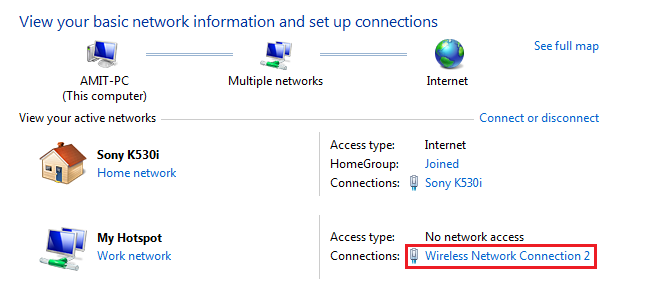
So in this case you will select "Wireless Network Connection 2". And click ok. Now you should be able to connect to internet.

Step 5:
Your hotspot is ready now, you can actually connect to your hotspot but it will show limited connection for now. you just need to stop it and start it again. In order to stop hotspot run following command:
netsh wlan stop hostednetwork
followed by:
netsh wlan start hostednetwork
netsh wlan stop hostednetwork
followed by:
netsh wlan start hostednetwork
Now your hotspot has started transmitting. You can see your hotspot in your smartphone's wifi Networks. But this is not the end. You can connect to hotspot but will not be able to connect to internet until you allow internet sharing for the interface you are connected to. To allow internet sharing follow step 4.
Do hit g+ button if you like the post.
